Pay once, download forever
- No subscription, no renewal — yours forever
- Session saved — resume after checkout
- Trusted by 1,500+ musicians
- 30-day money-back guarantee

Sign in to continue
No password needed. Downloading parts requires Premium.
Extract parts
from your score
by instrument.
Upload a full score and download clean, separate parts for every instrument — without leaving your browser.
Extract parts from any score in minutes
ScorePartify lets you extract individual parts from a full score — orchestral, ensemble, concert band, or choir. Whether you need to separate parts from a full score or isolate a single instrument, ScorePartify works entirely in your browser — no installation needed. Upload your PDF, visually select each instrument's staves, and download clean, separate parts ready to print or share.
Discover all advanced features →Frequently Asked Questions
Is my work saved if I close the browser?
Yes — sessions are saved locally in your browser for 30 days. Reopen ScorePartify on the same device and browser and you'll find your score right where you left off. Note that sessions are not stored on our servers, so switching device or browser means starting over.
Are my PDFs stored on your servers?
No. Your PDF is processed temporarily to generate page images and is discarded immediately after — nothing is ever saved on our end. Your score stays private.
Why do I need to pay to download?
Uploading and previewing are always free. Downloading the extracted parts requires a one-time payment of €4.99 — which unlocks downloads on unlimited PDFs, forever. No subscription, no recurring charges, ever.
How do I draw the layout correctly?
Each block must contain all the instruments of one system — one band per instrument, stacked vertically. Here's the full flow:
1. Draw bands to separate each instrument's staves on the first system.
2. Click "Confirm block" — focus moves automatically to the instrument labels.
3. Type each instrument name and press Tab or Enter to move to the next.
4. Use "Copy to this page" or "Copy to all pages" to apply the same layout to the rest of the score.
Watch the demo video to see the full workflow.
Can I edit a system after confirming it?
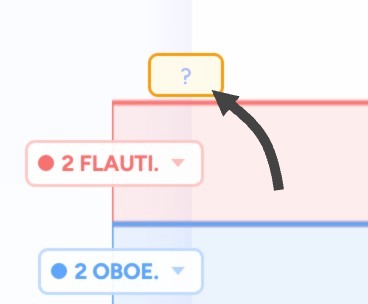
Yes. Click "Confirmed block" on any system to toggle it back to edit mode. From there you can: add more staves by drawing additional bands; rename an instrument by double-clicking its label; reassign a band to a different instrument by single-clicking the label to open a dropdown; adjust a border by dragging the line between two bands; delete a single band by clicking the × on its label; or delete the entire system by clicking the red × icon at the bottom-left.
How do I delete a score from my session list?
Click the × on the top-right corner of the session card on the homepage. This removes the saved session from your browser.