
A step-by-step guide to splitting any score into individual instrumental parts — upload a PDF, extract parts, and download them.
If you're a music teacher, band director, orchestra member, or musician, you've probably faced this situation: you have a full score in PDF but need to hand out individual parts to each player. Printing the entire score for everyone is wasteful, and manually cropping pages in a PDF editor is tedious and error-prone.
ScorePartify solves this problem. It lets you separate individual parts from a full score — visually select each instrument's staves and export them as clean PDF files ready to print or share digitally. Whether you work with an orchestral score, a concert band arrangement, or a choir score, ScorePartify turns your full score into individual parts in minutes.
Open ScorePartify and drag your PDF onto the upload area, or click the Load PDF button. The tool accepts any PDF score: orchestral, ensemble, band, choir, or chamber music.
This step has three phases:
Draw — tap two points on the score to create a band (top edge, then bottom edge). Bands chain automatically and snap to nearby edges. Repeat for every instrument in the system.
Confirm — click Click to confirm block to lock the system. Each band is now a confirmed instrument row.
Assign — use the dropdown on each band to assign an existing instrument, create a new one, or double-click the chip to rename it. Click the number above each system to set the first bar; press Enter or Tab to move quickly to the next system.
Switch to the Preview tab to see each extracted part one at a time. Use the instrument selector in the card header to navigate between instruments. Insert page breaks by hovering between staves and clicking. You can also combine two or more instruments into a single merged PDF (see below).
Download a single instrument as PDF, or grab everything at once as a ZIP. Downloading requires a one-time Premium upgrade (€4.99).
Ready to extract parts from your score?
Open ScorePartify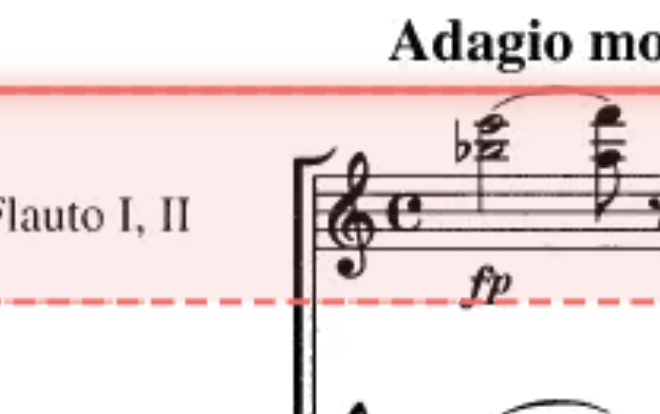
Drag a band edge to adjust its height. Adjacent bands share a border — dragging one moves both at the same time.
Drag the handle on a confirmed block to reposition the entire system up or down on the page.

When a page is empty, copy blocks from the previous page — either to just this page or to all remaining pages at once.
Click the number above each system to set the first bar. Bar numbers can be entered manually — press Enter or Tab to move quickly to the next system. A yellow triangle on a thumbnail means a number is missing. Enable Bar numbers in the Preview tab to print them on every extracted part.
In the Preview tab, click "Combine instruments" in the card header, select two or more instruments, and click Create. The staves are interleaved in system order — ideal for desk parts, reductions, or any custom grouping. Hover between systems to insert page breaks (a system is never split across pages). Combined parts appear in the Download tab and are included in the ZIP. Rename or delete them from the card header at any time.
Click inside the top band of a confirmed system to add a text label — useful for performance notes, cues, or any text you want printed on the part. The label is automatically copied to all bands in the system. Use the grip handle to reposition; use the toolbar to resize or delete the annotation.
Use the rotation slider (±5°) to straighten scanned pages that are slightly tilted. Rotation is applied per page and is preserved in both the Preview and the downloaded PDF.
In the Preview tab, hover between two staves and click to insert a page break — a dashed line marks where the page will split. Click again to remove it. Breaks apply to all instruments at once and are used in the downloaded PDF.
In the Preview tab, only one instrument is shown at a time. Use the dropdown selector in the card header to switch between instruments instantly. The card displays the rendered PDF pages with all your settings applied — page breaks, scale, contrast, and bar numbers.
Your work is automatically saved as you go. Sign in with Google to access your sessions from any device, or resume where you left off after closing the browser. Open sessions from the list on the home screen.

Use the ↩ ↪ buttons in the toolbar or Ctrl+Z / Ctrl+Y. To remove all bands from the current page or all pages, use the × button on a block or the Clear option in the toolbar.
Switch to the Download tab to find all your parts ready to export. Individual instruments are listed first; any combined parts you created appear in a separate section below. You can download each part as a standalone PDF, or use Download all as ZIP to get everything at once — combined parts are included automatically.
Before downloading you can adjust several options:
Downloading requires a one-time Premium upgrade (€4.99) — no subscriptions, no watermarks.
Try it now
Open ScorePartifyHow do I extract parts from a score?
Upload your score as a PDF to ScorePartify, draw bands over each instrument, and download the individual parts as separate PDFs. It works entirely in the browser — no installation required. Sign in with Google to download.
Is ScorePartify free?
ScorePartify is free to use for uploading, splitting, and previewing scores. Downloading parts as PDF or ZIP requires a one-time Premium upgrade (€4.99). No subscriptions, no watermarks.
Does it work with orchestral scores?
Yes. ScorePartify works with any PDF score — orchestral, ensemble, band, choir, or any other format. Instruments are detected automatically from the score labels.
Do I need to install anything?
No. ScorePartify runs entirely in your browser. Your files stay on your device and are never uploaded to any server for storage.
Can I separate parts from a full orchestral score?
Yes. ScorePartify works with full orchestral scores, concert band arrangements, choir scores, and any other multi-instrument PDF. Upload your full score, draw bands over the staves, and download each individual part.
Can I print a single part from the score?
Yes. After extracting the parts, download the one you need as a PDF and print it directly. You can also isolate any instrument and share the part digitally.
Does it work as a score-to-parts tool?
Absolutely. ScorePartify is designed to convert a full score into individual parts — a true score-to-parts tool. It creates separate, clean PDFs for each instrument, ready to print or distribute.
Can I combine instruments into a single part?
Yes. In the Preview tab, click Combine instruments in the card header, select two or more instruments, give the part a name, and click Create. The combined part interleaves the staves of all selected instruments in system order — useful for desk parts (e.g. two violin desks on one sheet), condensed scores, or any custom grouping. Combined parts appear in the Download tab and are included in the ZIP. You can insert page breaks between systems, rename the part, or delete it at any time.